From matched pairs to one row per item: grouping matches
A list of matched pairs is not a clean item list. How to turn pairs into groups with an id, a size and a shape, and why to build them after review.
You have matched two item lists, a warehouse export and a supplier catalog, say. The output is a file of pairs: record A17 matches record B203, A18 matches B203, A18 matches B240. Three rows, and the question you actually care about is not answered by any of them. How many distinct items are there? Are A17 and A18 the same item? Is B240 a third product or another name for B203?
Pairs describe relationships. What most downstream work needs is a list of things: one row per real-world item, with an id you can count, filter and join on. Getting from the first to the second is a step of its own, and it is where a matching project quietly goes wrong.
Why is a list of matched pairs not a list of items?
Three things stand in the way.
An item can appear in more than one pair. A17 and A18 both point at B203, so B203 is in two rows, and counting rows overstates the number of items.
Matching is transitive in practice but not in the pairs. If A18 is linked to B203 and to B240, then B203 and B240 are the same item as far as your data says, yet no row says it.
Items with no match do not appear at all. A pair file lists only what matched, so the records that found no partner are missing from it, and any “total items” figure you derive from it is wrong.
The fix is to turn the accepted pairs into groups and write a table with one row per record, each carrying the id of its group.
How are matched pairs turned into groups?
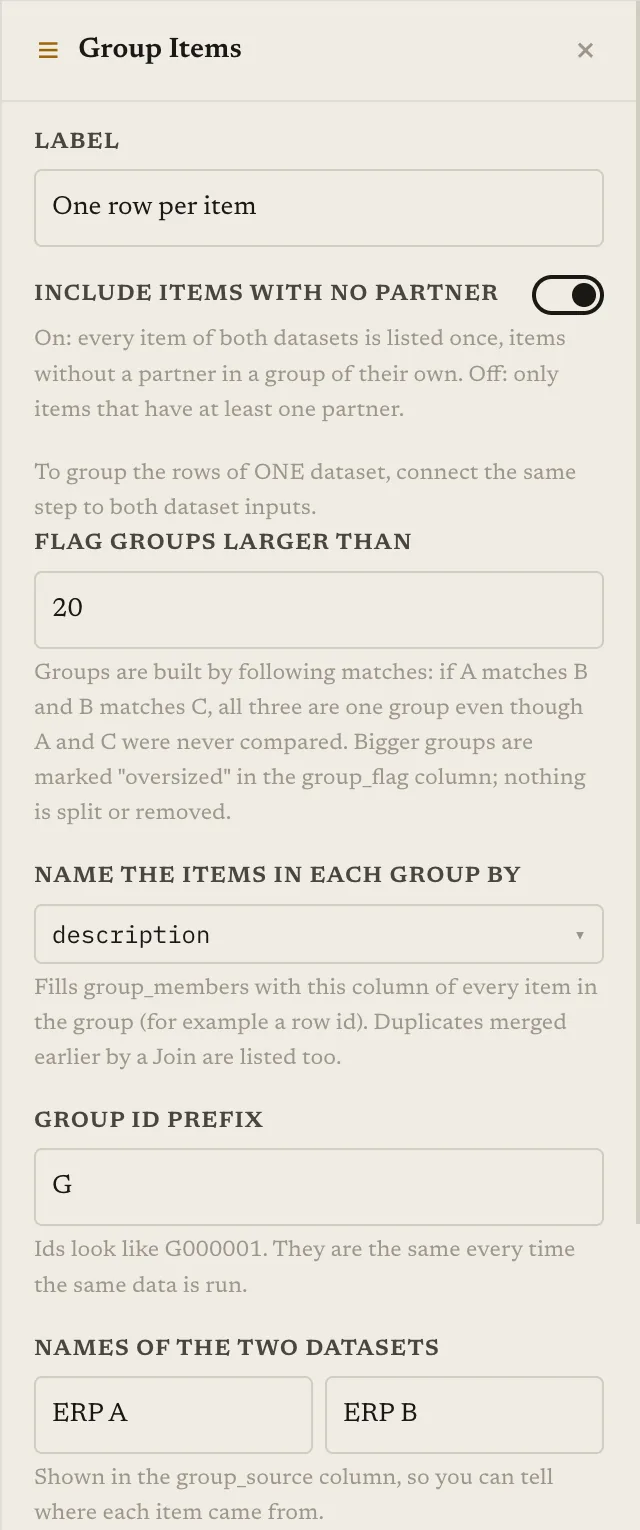
By following the links. Every accepted pair connects a record in dataset 1 to a record in dataset 2. Records that can reach each other through those links, in any number of steps, form one group. This is the standard idea of connected components, and it is what Group Items in Match Data Studio does.
A hypothetical example, using made-up records:
| Accepted pairs | Group | Members |
|---|---|---|
| A1 – B1 | G000001 | A1, B1 |
| A2 – B2, A3 – B2 | G000002 | A2, A3, B2 |
| A4 – B3, A4 – B4, A5 – B4 | G000003 | A4, A5, B3, B4 |
| (none) | G000004 | A6 |
A2 and A3 were never compared with each other. They are in one group because both matched B2.
The third group is built from three pairs and holds four records, two from each dataset. Nothing in the pairs says A4 and A5 are the same item. The chain through B4 says it.
What does the grouped output look like?
Group Items has two outputs. The main one lists one row per item of both datasets, with the group columns added to the left of the original data. A made-up excerpt:
| record | group_id | group_size | group_shape | group_flag | group_source | group_members |
|---|---|---|---|---|---|---|
| A2 | G000002 | 3 | many_to_one | several_per_side | A | A2; A3; B2 |
| A3 | G000002 | 3 | many_to_one | several_per_side | A | A2; A3; B2 |
| B2 | G000002 | 3 | many_to_one | several_per_side | B | A2; A3; B2 |
| A6 | G000004 | 1 | single | A | A6 |
Every record keeps its own row and its original columns (the record column here stands for them). The group columns repeat on each member of a group.
What each column means:
- group_id. A text id such as G000001. Groups are numbered by their smallest member, dataset 1 before dataset 2, so the same data produces the same ids every time. You can change the prefix.
- group_size, group_d1_count, group_d2_count. How many records the group has, and how many from each dataset.
- group_shape.
single(no partner),one_to_one,one_to_many,many_to_oneormany_to_many. - group_flag. Empty,
oversized, orseveral_per_side. - group_members. The values of a column you choose, for example a row id or a SKU, for every record in the group, separated by semicolons.
- group_source. The name you gave the dataset the row came from, so you can tell where each item came from.
You can also map two differently named columns into one shared column, so that the item table reads as a single list rather than two lists stacked.
The second output is the original pairs with the group id added, which keeps any export built on pairs working.
Should unmatched records be in the table?
By default, yes: every record of both datasets appears exactly once, and a record without a partner gets a group of its own with the shape single. That makes the table complete, and complete is what lets you count, deduplicate and join on it. Turn the option off when you only want the groups that actually have a partner.
Why build groups after review, from accepted pairs only?
Because the transitive rule has a sharp edge. One wrong pair is not one wrong row. It can join two groups that were each correct, and every record in both now shares an id. Take two real items, X and Y, each with a correct group of three records. Add one false link between a record of X and a record of Y, and you have a six-record group that describes nothing.
Group Items does not try to guess where such a chain is wrong. It never splits or removes anything. It builds exactly the groups the pairs imply, and flags the suspicious ones: a group larger than the size you set is marked oversized, and a group that spans both datasets but holds more than one record from the same side is marked several_per_side. Both are worth looking at, because they are what a chain looks like from the outside.
So the sensible order is:
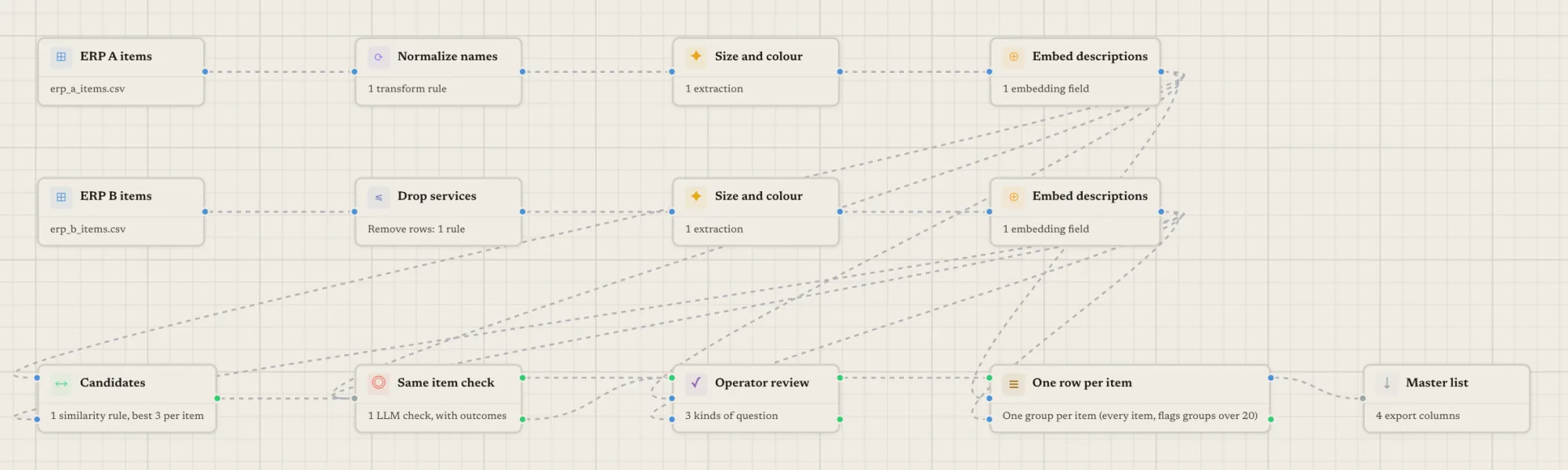
- Find candidate pairs and score them.
- Decide the uncertain ones. Thresholds create the review band, and a Human Review step answers it.
- Wire the pairs that were kept to Group Items, not the raw candidates.
Using the kept output of a review step as the input means every link in a group was accepted by a rule or a person. The flags then catch what remains, instead of being the only defence.
How is this different from keeping the best match?
Resolve Matches and Group Items answer opposite questions.
Resolve Matches counts how many times each item is matched and, in “keep the best partner” mode, drops pairs until each item has at most one partner, choosing by highest score. That is the right tool when the real relationship is one-to-one, as described in one-to-one matching: why the best match isn’t enough. It deliberately throws away links.
Group Items throws away nothing. It is the right tool when several records can legitimately describe one item, such as a product listed under three supplier codes, and you want them under one id. The two can be combined: Resolve Matches in flag-only mode adds the match counts, which can drive a “several candidates” question in review, and Group Items then builds groups from what the reviewer accepted.
And how is it different from Join’s remove duplicates?
A Join configured as an anti join with the duplicates option set to keep the first row groups records inside one dataset: rows that match each other form a group, only the first row of each group stays, and the step adds dup_group_id and dup_group_size, optionally a merged_ column listing the values of the whole group. It reduces a dataset.
| Step | Works on | What it does to the pairs | Result |
|---|---|---|---|
| Group Items | Two datasets, or one against itself | Keeps every accepted link | One row per item of both datasets, with a group id |
| Resolve Matches | Pairs between two datasets | Drops links until each item has one partner | Pairs, one partner per item |
| Join, remove duplicates | One dataset | Merges rows that match each other | The dataset with one row per group |
They fit in sequence. Clean the duplicates inside each file first with the Join. If you gave that Join a column to list, Group Items can use the merged list as the group members, so a group names every original record and not only the survivors. Then match across the two files, review, and group.
Group Items also works on a single dataset. Connect the same step to both dataset inputs and the rows are grouped with each other; the shape of such a group reads cluster.
What does grouping not do?
It does not choose a “best” record per group, merge column values beyond the members list, or split a group that looks too big. Those are separate decisions that depend on your rules, and a table that keeps every original row lets you make them with the evidence in front of you. The group id is the handle: once every record carries one, building a master record per item is a normal grouped operation in whatever tool you use next.
The part worth getting right is the order. Pairs, then decisions about the uncertain ones, then groups from what was accepted. Reverse it and the table looks tidy while hiding a handful of chains.
Keep reading
- One-to-one matching: why the best match isn’t enough — the opposite choice, one partner per record
- Master data management: what it actually takes to keep one version of the truth — what to build once every record has a group id
- Entity resolution explained: turning messy records into clean data — the wider problem grouping belongs to
- Auto-accept, review, reject: using two match thresholds — deciding which pairs reach the grouping step
Ready to match your data?
Create a free account, upload your CSV files, and configure matching in plain English. 100 free credits — no credit card required.
Free account No credit card Match your files in minutes