Who reviews the uncertain matches? Human review for matching teams
Every matching run leaves pairs no rule can decide. How to turn them into review work a team can split, deadline and audit, not one person's backlog.
A matching run finishes. Most pairs are clearly the same item or clearly not. A band in the middle is neither: two product descriptions that differ by a pack size, two company names that might be a parent and a branch, a pair where the AI check itself said it was not sure. A rule cannot decide those, and guessing in either direction puts errors into the result.
So someone has to look at them. On the first run that is usually you, and it is fine. On the tenth run, with a few hundred uncertain pairs every time, it has become a standing chore that waits for one person’s free afternoon. The run is paused until that person gets to it.
Choosing the thresholds decides how big that band is. This post is about what comes after: who answers the questions in it, how the work is divided, what happens when nobody finishes, and how you check afterwards what was decided and by whom.
What is a human review step in a matching pipeline?
In Match Data Studio it is a step on the canvas, placed after the pairs have been found and scored. You give it three things.
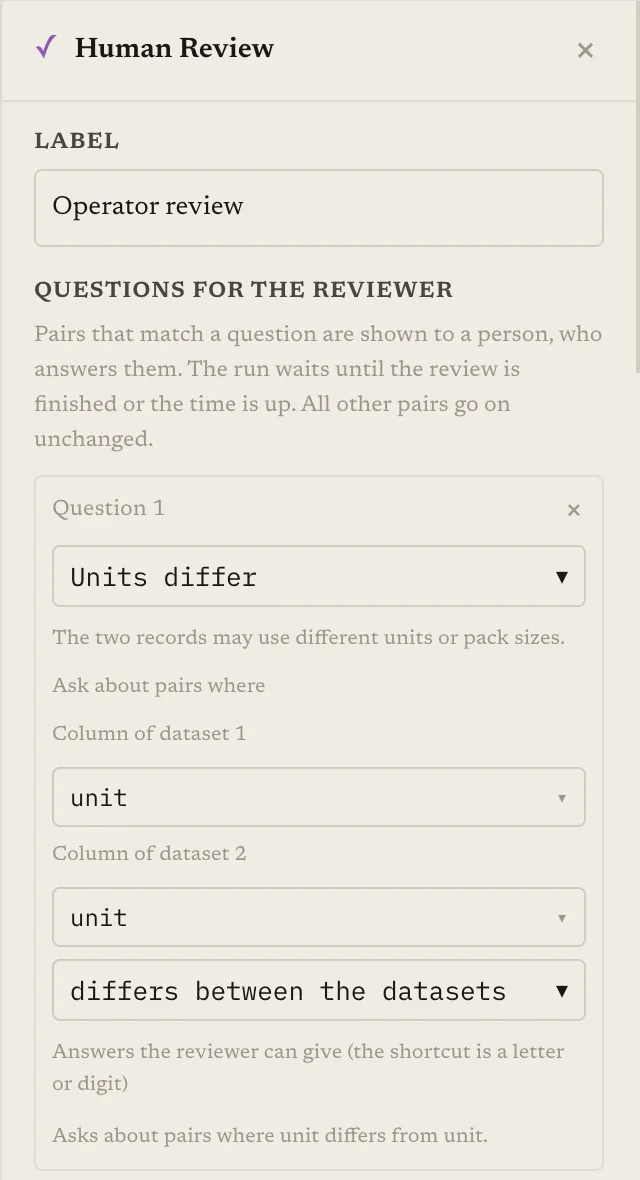
Questions. Each question describes a kind of uncertain pair, a rule for recognising it, and the answers a reviewer may give. There are five kinds to start from:
| Kind | Meant for | Starting answers |
|---|---|---|
| Uncertain match | The AI was not sure the two records are the same item | Same item, Different item |
| Units differ | The records may use different units or pack sizes | Same item (ignore units), Same item (units differ, with a number), Different item |
| Piece or set | One record may be a single piece and the other a whole set | Same item, Part of the set, Different item |
| Several candidates | One record has several possible partners | Pick the right one, or None of them |
| Custom question | Anything else, with your own answers | You write them |
Each answer has a fixed effect on the pair: keep it, drop it, set it aside, keep it and save a number, or keep the chosen candidate.
Triggers. A question applies to the pairs that meet a condition on one of their columns: a column is or is not a given value, is empty or not empty, differs between the two datasets, or is greater than a number. If a pair meets the conditions of several questions, it is asked about the first. Conditions are chosen from a list; no code is involved.
What the reviewer sees. Up to twelve columns shown side by side for the two records, and optionally a note column under each pair, for example the reasoning an AI check wrote.
The pairs come from wherever you wire them. A common setup is an AI check configured so that an uncertain answer is routed to review, with its held pairs wired into the review step. The step then has two outputs: pairs that were kept (accepted by a reviewer, or never asked about) and the rest (dropped, set aside, or not decided). Both outputs gain columns recording the question, the decision, any saved value and when it was reviewed.
What does the reviewer actually do?
They open a page that shows one pair at a time. The answers are buttons, each with a keyboard shortcut. Back changes the last answer, Skip moves on, and a list view shows all items filtered by open, decided or skipped. A progress bar shows how much is left. Answers are saved as the reviewer goes, so stopping halfway and coming back later loses nothing.
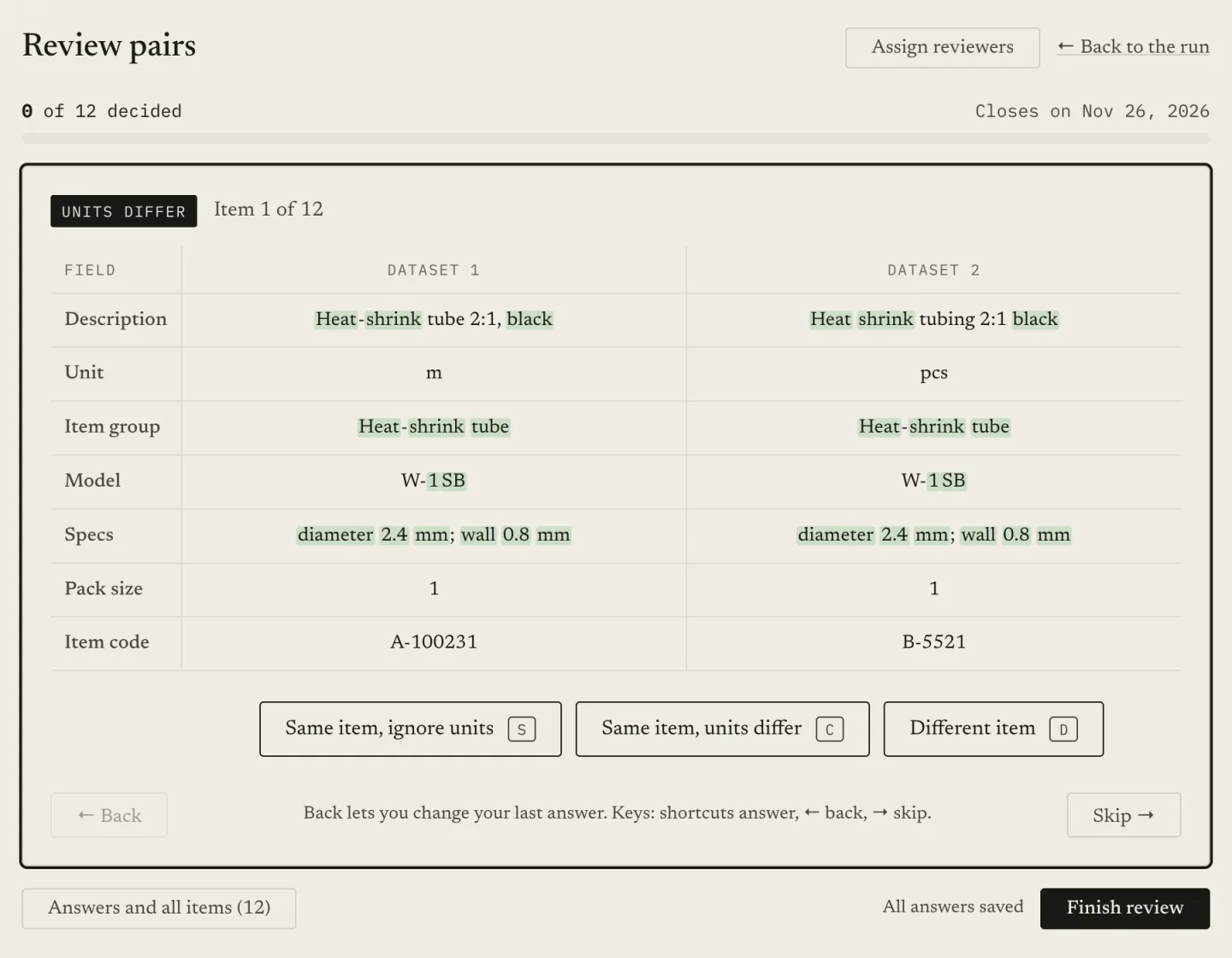
Two details matter for quality. Answer options are fixed per question, so a reviewer cannot invent an outcome the pipeline does not know how to apply. And cells that are an image address, or the name of an image uploaded to the project, appear as pictures, which helps when the difference between two items is visual.
Running the step once on a sample is a cheap way to see the questions from the reviewer’s side before the real run. Sample runs wait for review as well.
What happens when the review is not finished in time?
A review that waits forever is a stuck run, so every review step has a deadline, set in days. You also choose what the deadline means:
- Leave the open items for later. The run continues. Items still unanswered are set aside as unreviewed.
- Stop the run and refund. If anything is still open at the deadline, the run stops and its credits are returned.
The first suits a result that is useful even with a few pairs missing. The second suits a result where a hole is worse than no result, such as a reconciliation that must be complete. Choose deliberately, because the default behaviour of a late team is otherwise decided for you by whoever forgot.
The account owner is told by e-mail when the review opens, with the deadline and the consequence stated, and again when less than a day is left.
Who should be allowed to answer review items?
Answering questions is not the same job as running the account, and it should not need the same access. Match Data Studio has a team with four roles besides the owner. Three are relevant here:
- A member builds and runs, and can answer any review item.
- A viewer reads results and cannot answer.
- A reviewer is a restricted role. A reviewer sees only the review items assigned to them. No projects, no files, no credits. An item that is not theirs behaves as if it does not exist, and a reviewer cannot finish the review for everyone else.
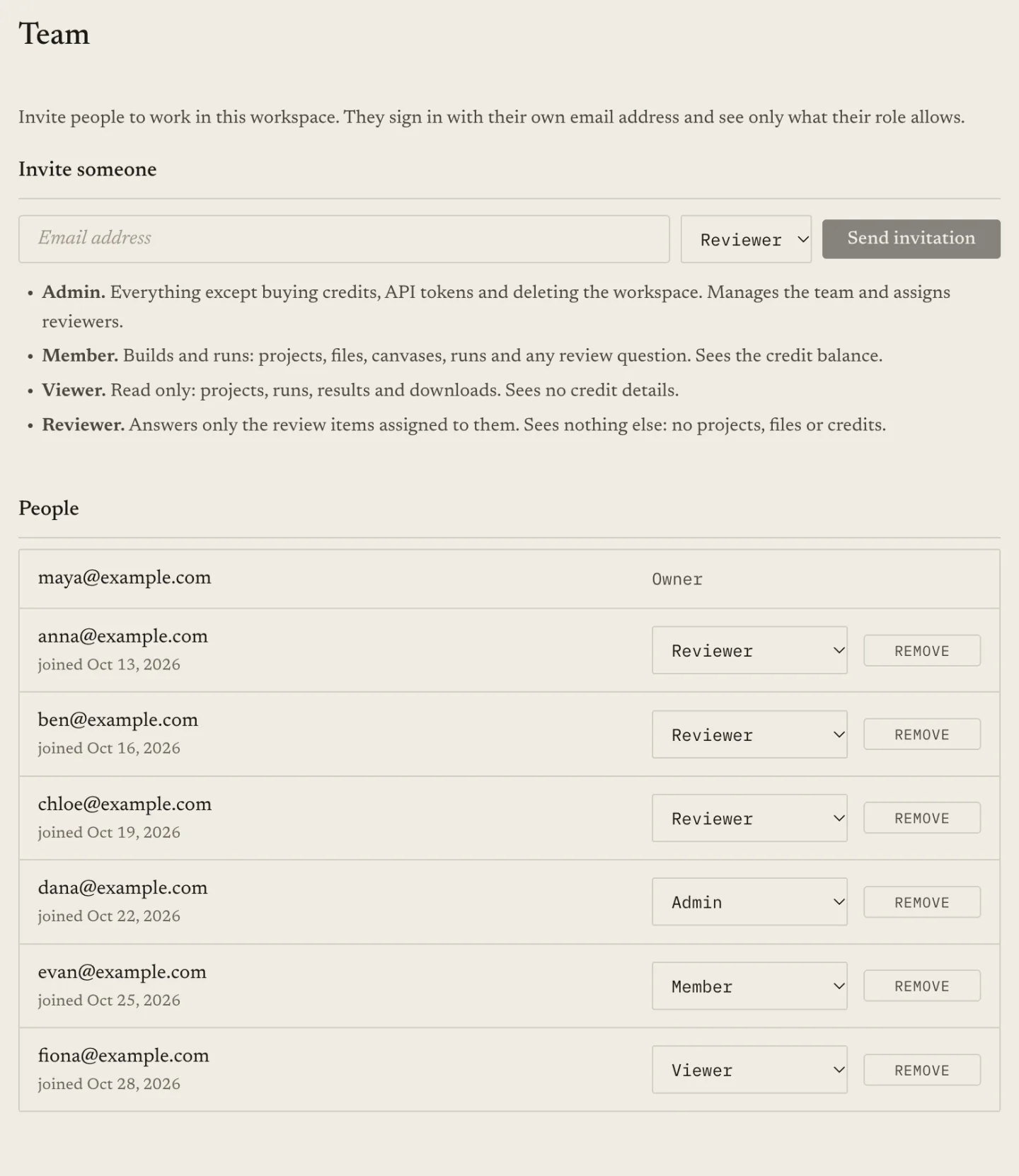
A reviewer is invited by e-mail, and signs in with a link sent to the invited address. That makes it practical to bring in a colleague from another department, or someone outside your company, who knows the products or the customers better than you do, without opening your workspace to them.
How do you divide the queue between reviewers?
An owner or admin assigns items from the run page. There are several ways to do it:
- To one reviewer, all items.
- A range. Items 1 to 40 to one person, 41 to 80 to another.
- Evenly. The queue is cut into consecutive blocks whose sizes differ by at most one.
- By percentage. Each reviewer gets a share, and the shares add up to 100. The queue is cut into consecutive blocks as close to each share as whole items allow, with leftover items going to the biggest fractional remainders.
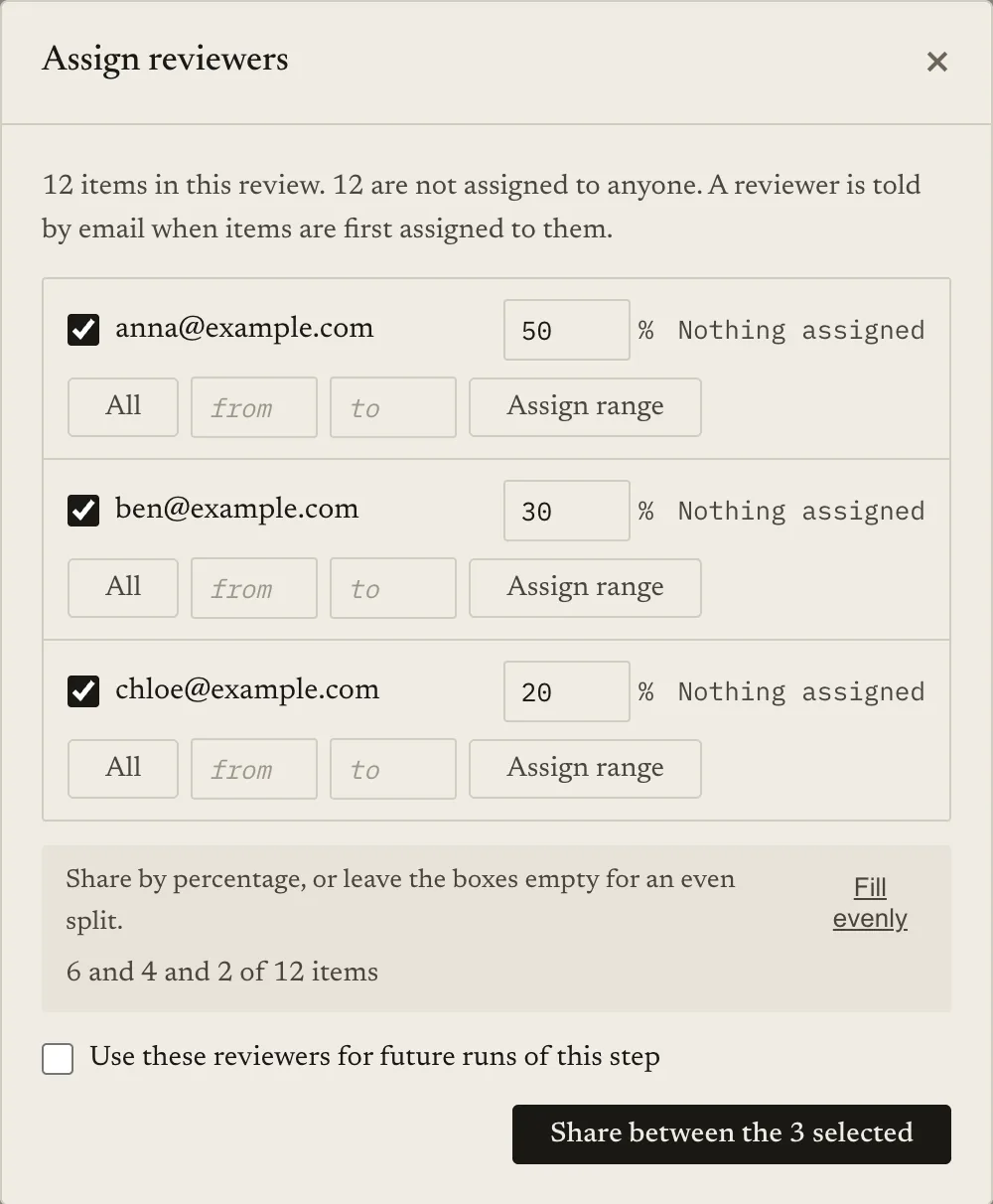
The page previews the result before you confirm. A made-up example with a 15-item queue:
| Method | Reviewers | Result |
|---|---|---|
| Evenly | Two reviewers | 8 and 7 items |
| Evenly | Three reviewers | 5, 5 and 5 items |
| Percentage 50 / 30 / 20 | Three reviewers | 8, 4 and 3 items |
Illustrative arithmetic, not a measured run. Blocks are consecutive: the first reviewer gets the first items in the queue.
Percentages are useful when people have unequal time. The person who reviews on Fridays only does not get the same load as the person whose job this is.
Can the assignment happen automatically?
The weekly version of this job should not need an owner to open the run, split the queue and wait for a reply. For each review step, an owner or admin can save default reviewers, optionally with percentage shares. When a later run publishes its review queue, the items are shared among those people and each is told by e-mail, with no one opening the run.
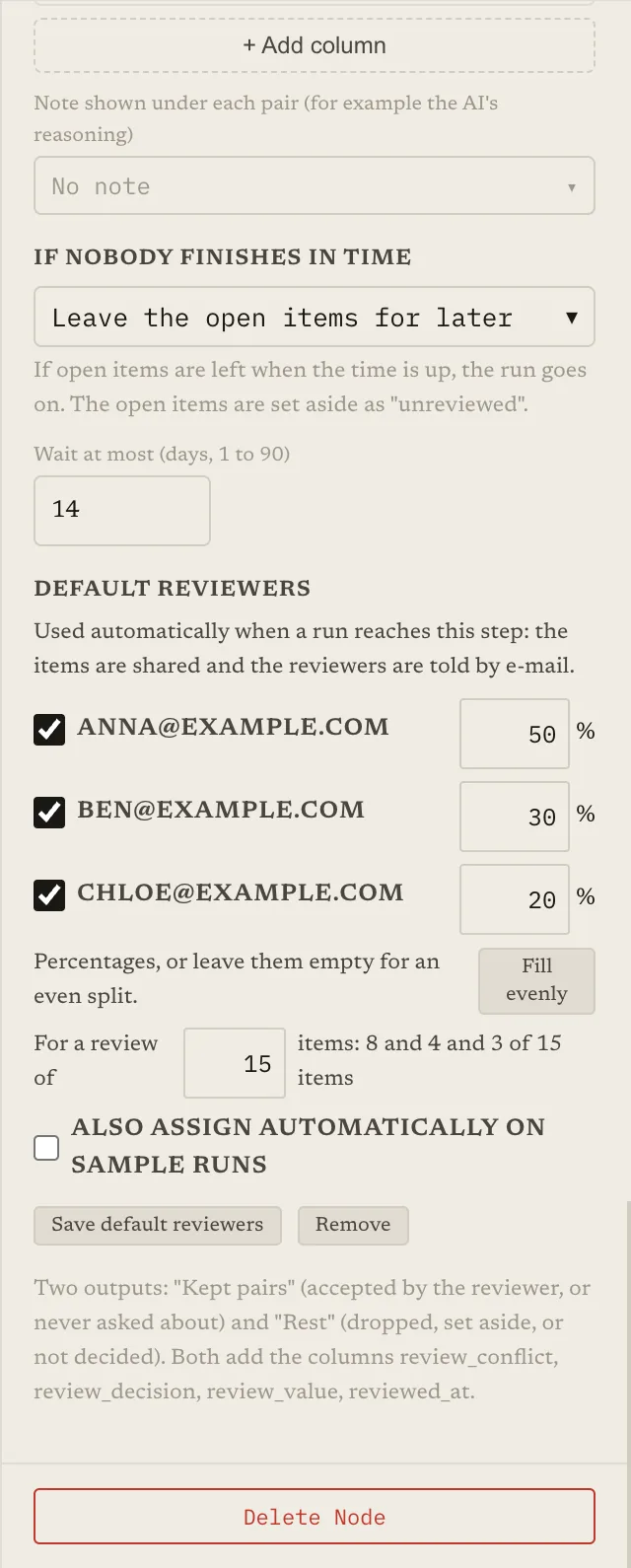
The rules around it are deliberately conservative:
- A manual assignment is never overwritten. If someone has already assigned items for that step in that run, the defaults do nothing.
- People who left are skipped. Default reviewers are checked against the team at the moment the queue opens. Someone who is no longer a reviewer drops out and the shares of the others are recalculated. If nobody is left, nothing is assigned, and the owner’s e-mail says so.
- Failures are visible. If the automatic assignment fails, the owner’s e-mail says the items were not assigned, so the run does not quietly sit unassigned.
- Sample runs are not assigned by default, since a sample’s questions are usually for you to try the setup. It is a checkbox if you want them assigned too.
- The owner is still in the loop. The owner still gets the “run needs your answers” e-mail, now naming who got which items.
The defaults are saved on the project, not inside the canvas graph. A graph is something that gets exported, imported and edited by members; who may be asked to review is something only an owner or admin should decide.
What do the e-mails say?
The owner gets one when the review opens: how many questions, how many still need an answer, the deadline and what happens at it. Each assigned reviewer gets their own, with their item count, the deadline and a button that opens the review. Nothing in the reviewer’s e-mail mentions credits or costs.
How do you see who was assigned and who answered what?
After the review closes, the answers page lists every item with its answer. At the top it shows who the items were assigned to: each reviewer, how many items they were given, how many they answered, and how many were not assigned to anyone. You can filter by answer and by who answered. A reviewer who has since left the team appears as a former team member rather than disappearing from the record.
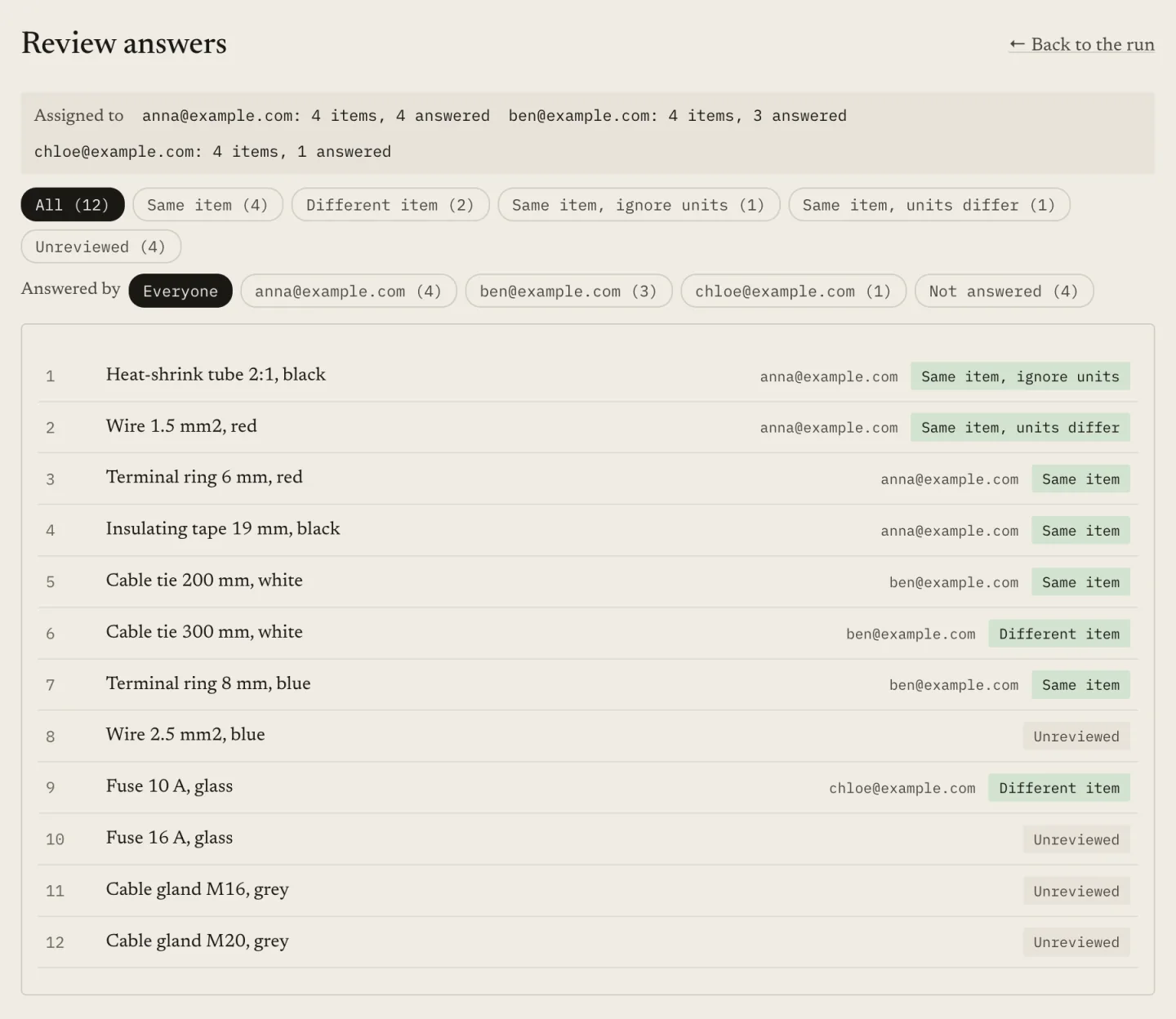
That record earns its keep when one reviewer’s answers look different from everyone else’s, when a disputed pair comes up weeks later and you need to know who decided, and when recurring answers should become a rule: if reviewers keep answering “same item” on a certain pattern, that pattern belongs in an earlier step, not in a queue.
Reviewers do not see who answered what. That view is for the team.
A workflow that holds up
Keep the band narrow enough that review is worth a person’s time. Write questions with a few plain answers. Run a sample and answer some items yourself to see whether the question is clear. Save default reviewers with a deadline that matches how your team really works. After each run, look at the answers page and move any repeated pattern upstream. Then check the final result against a labelled sample, as in how to measure matching quality.
Keep reading
- Auto-accept, review, reject: using two match thresholds — sizing the band that reaches reviewers
- One-to-one matching: why the best match isn’t enough — collisions are good candidates for review
- How to measure matching quality — checking the result after review
- Common matching mistakes
Ready to match your data?
Create a free account, upload your CSV files, and configure matching in plain English. 100 free credits — no credit card required.
Free account No credit card Match your files in minutes