Matching item masters between two ERP systems: units, services, sets
Two ERPs, two item lists, different languages, units and services. How to filter, extract, embed, check and review so one piece is not matched to a set.
Picture two item lists from two systems, say SAP on one side and 1C on the other. Both describe roughly the same warehouse, but nobody typed them with the same rules. One names things in English, the other in Russian. One writes the unit in a column, the other buries it in the title. One list includes services, such as delivery or installation, that the other system does not keep as items at all. And some pairs look identical until you notice that one counts pieces and the other counts sets of ten.
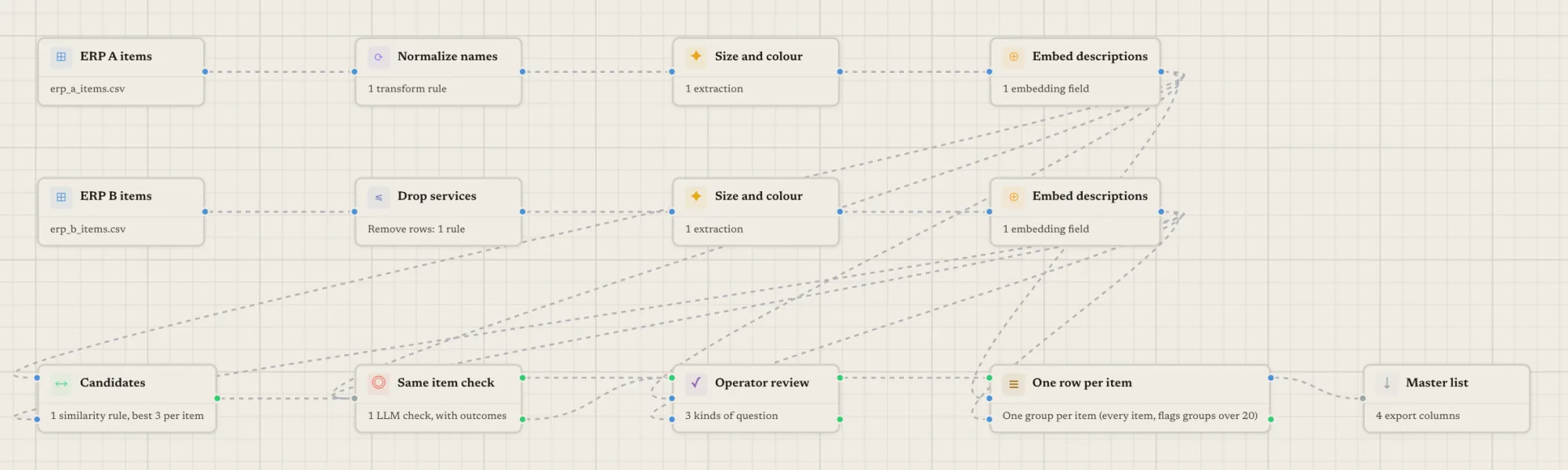
This is a common shape for an item master clean-up, and it breaks the simplest approach, which is to embed both names and take the nearest neighbour. Here is a pipeline that treats each problem separately. Every example below is hypothetical.
Why item masters are hard to match
Three things go wrong at once.
| Problem | What it looks like | What it needs |
|---|---|---|
| Rows with no counterpart | A service line in system A, no service lines in system B | Remove them before matching |
| Different wording or alphabet | A name in one language, the same item in another | Comparable attributes and meaning-based candidates |
| Same product, different unit | One piece against a pack or a set | A direct comparison of the unit, then a human decision |
A hypothetical pair to keep in mind:
| System A | System B | |
|---|---|---|
| Name | Cable VVGng 3x2.5, per metre | Кабель ВВГнг 3х2,5, бухта 100 м |
| Unit | m | roll |
| Item type | Goods | Goods |
Made-up data for illustration only.
Nearly every word agrees. Whether it is the same item depends on whether you are comparing a metre with a roll of one hundred, and that is a decision about units, not about names.
Step 1: remove the rows that cannot match
Start with a Row Filter on the dataset that holds the services. Choose “remove”, and add a rule such as type equals Service. The rules available include equals, contains, starts with, “in” a list, is empty, and number comparisons. A few details that matter for item lists:
- Text is compared after trimming and ignoring case, and “contains” is a plain substring, never a pattern.
- A blank cell never matches an “equals” or “contains” rule, so an item with no type is not removed by accident.
- The rows that survive keep their original row id, so pairs and exports still point at the right rows.
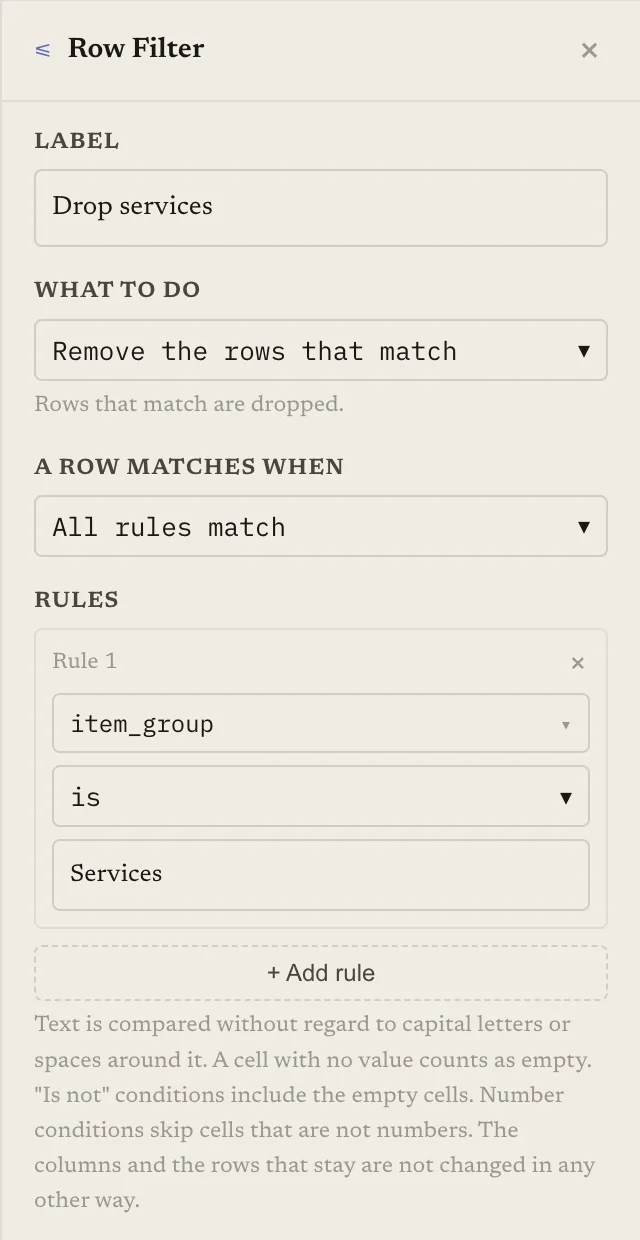
This step is free, and it keeps services from being embedded and checked at all. Keep a copy of the list of removed rows, so that “no counterpart” stays a recorded decision and not a silent drop.
Step 2: extract attributes you can compare
An embedding of a whole title mixes brand, size, material and unit into one vector. Extract them into columns instead. An AI Extraction step reads the text of each row and writes new columns from it. You write a prompt that refers to columns by name (for example Item: {name}), and define output fields of type text or boolean: brand, size, pack quantity, unit.
Some practical choices:
- Ask for the unit as one word from a short list you define, such as piece, pack, set, metre, kilogram. A free-text unit in two languages will never compare cleanly; a list will.
- Ask for the brand in a single writing system on both sides, so that two alphabets become comparable columns. The prompt is free text, so check on a sample that it does what you meant.
- Run the same extraction on both datasets, with the same output column names.
Extraction is charged by use, and a sample run processes only the sample rows. Open the sample’s output and read twenty rows before you spend credits on a full run.
Step 3: find candidate pairs
Candidates are pairs worth examining. Embeddings are the main route for them here.
An Embedding step turns text into numbers so that similar meanings end up close, and the result is a column called embedding_<name>. A template can embed several columns together, such as type: {item_type}; model: {model_no}, which is useful for putting the extracted attributes next to the name. Put the same Embedding settings on both datasets.
On languages, be careful about what you promise yourself. The product’s own example pipeline for this pattern is described for names that differ in wording or language, but we do not publish figures for particular language pairs, and how close two alphabets land depends on your text. Run a sample, look at the pairs it surfaces, and look for items you know match that it did not find. Extracted attributes help here because they give the comparison a common vocabulary.
Then pick the pair generator:
- Similar Items finds pairs whose embeddings are at least as similar as a threshold without listing every combination. Use it when the lists are large.
- Cross Join, then Similarity Score lists every pair first and scores them. Fine for small lists, and it lets you see the scores of everything.
For a threshold-tuning method, see auto-accept, review, reject: using two match thresholds.
You are not limited to one route. An AI check accepts the pairs of several routes at once, for example candidates from the name embedding, candidates from an attributes embedding, and a Join on equal item codes where both systems happen to share one. A pair found by more than one route is judged once. A cheap exact join on a code that both systems carry catches the easy ones with no AI at all. For the broader picture of catalog matching, see how to match product catalogs from different suppliers.
Step 4: let an AI check decide, with three outcomes
An AI check reads each candidate pair and decides whether it is the same item. Give it a choice field and map each answer to a route. For item masters, something like:
- same goes to match;
- uncertain goes to review;
- piece or set goes to review;
- different is dropped.
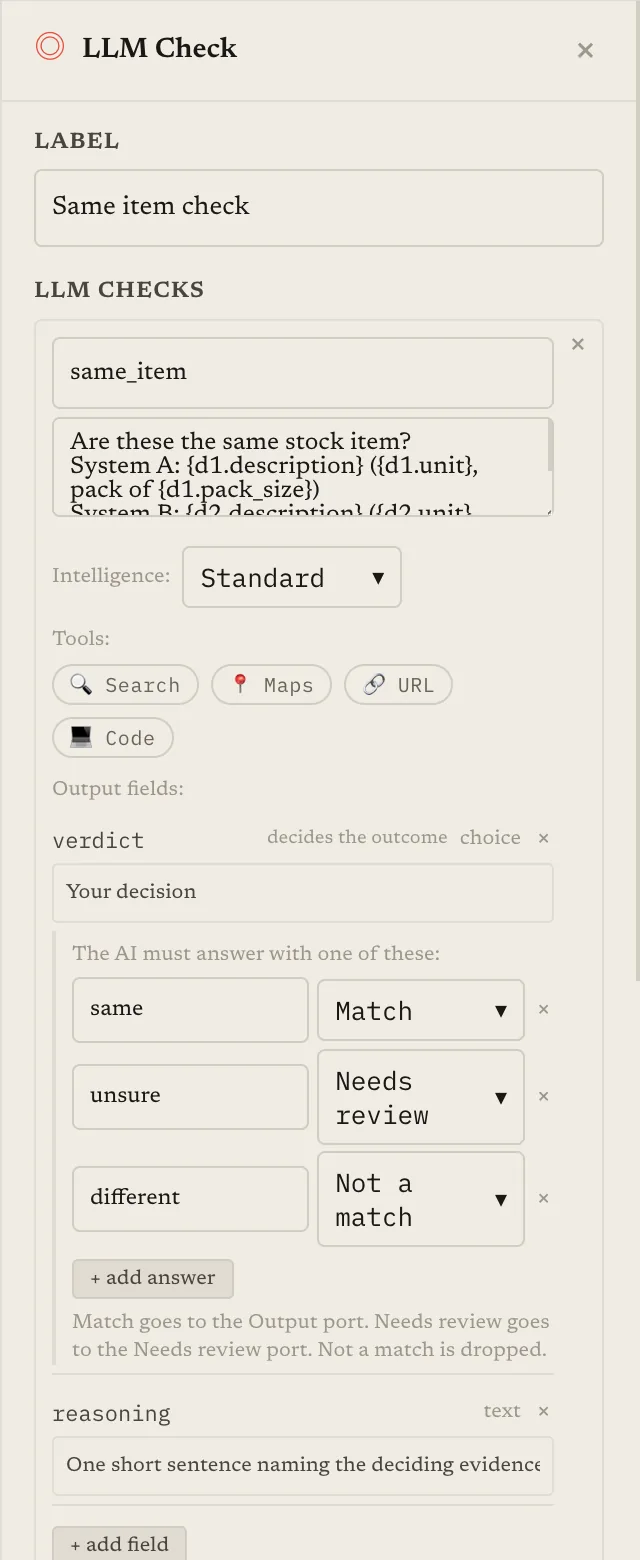
Your prompt can quote columns from both sides with {d1.name} and {d2.name}, as well as the extracted unit and size. The model can only answer with one of the listed values. Matched pairs leave on the normal output; pairs routed to review leave on a separate “held” output. The check adds a column per output field and a route column per check, which the next step reads. A “reason” field gives you a sentence of explanation for each pair, at slightly higher cost.
A check is charged per pair, so set “most pairs to check” and run a sample first. A sample checks only a limited number of pairs, enough to see the price and the behaviour, not enough to estimate recall.
Step 5: ask a person about units and sets
This is where a Human Review step earns its place. Wire the check’s matched output and its held output into the review step, along with both datasets. Pairs that trigger none of your questions pass through unchanged. Pairs that trigger a question wait for a person, and the run pauses until they answer or the deadline passes (14 days by default; you choose what happens to unanswered items).
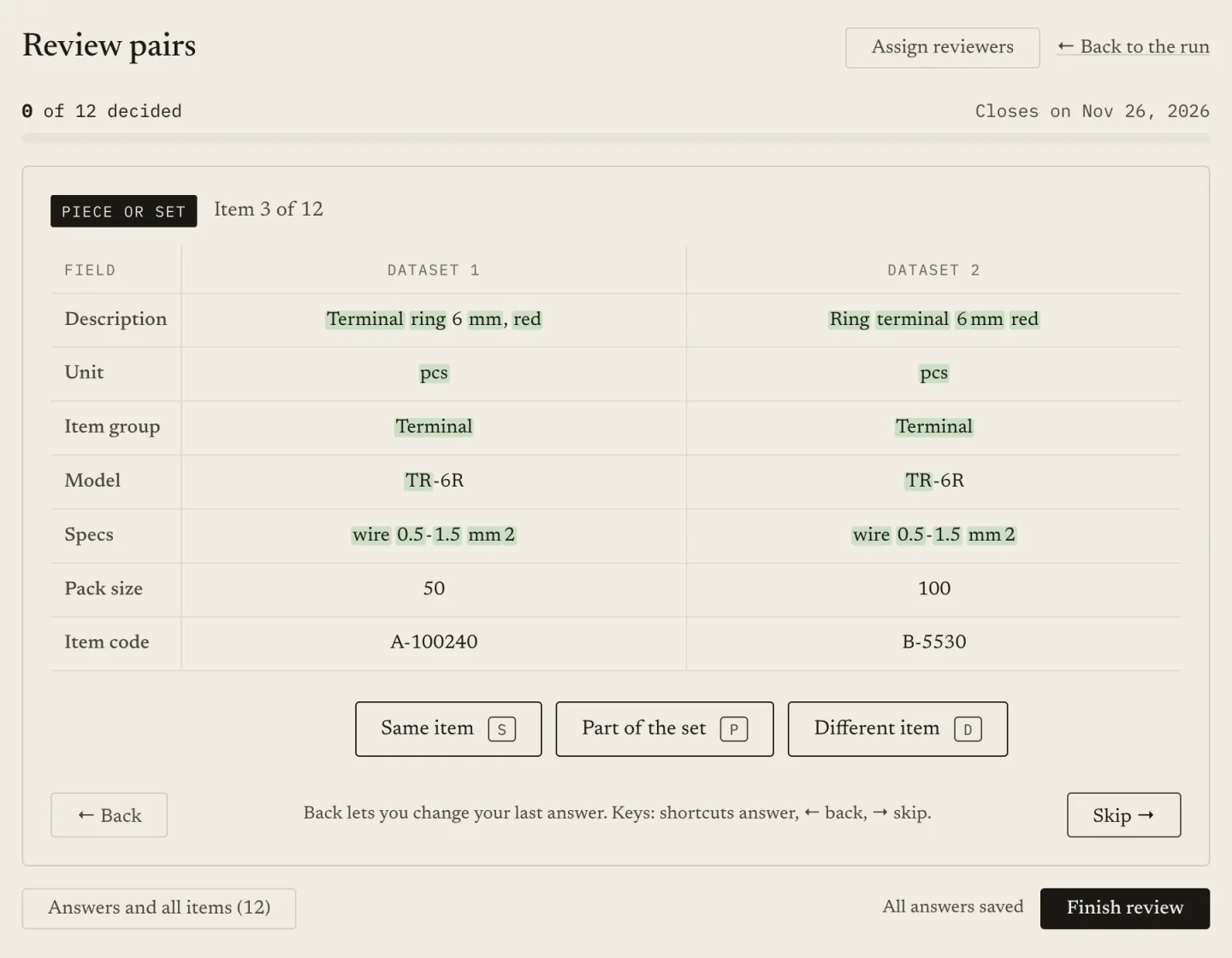
Two question types fit this problem:
- Units differ. The trigger compares a column of dataset 1 with a column of dataset 2 (the extracted unit) and fires when they differ as text. A blank on either side is treated as unknown, not as a difference. Because it is a text comparison, “pc” and “piece” count as different, which is why the extraction used a fixed list. The reviewer answers “same item, ignore units”, “same item, units differ” (the reviewer types a number, a conversion factor, that is saved with the pair), or “different item”.
- Piece or set. The trigger can be an answer from the check. The reviewer answers “same item”, “part of the set” (the pair is set aside and labelled so you can find it), or “different item”.
If a pair triggers more than one question, the reviewer is asked the first, so order them. A third type, “several candidates”, lets the reviewer pick the right partner when one item has more than one. You can invite colleagues with the Reviewer role and assign them items.
What this will still get wrong
- Embeddings do not read numbers reliably. Text that differs only in a size or a quantity looks almost identical to an embedding. That is why units and sizes are extracted into their own columns, compared directly and put in front of a person when they differ.
- Extraction can be wrong or empty. A blank unit is not flagged as a unit mismatch, so look at how many rows came out blank.
- The check is a reader, not an oracle. It sees only the columns you quote in the prompt. If the unit is not in the prompt, it cannot weigh it.
- A threshold is not portable. A cutoff tuned on one pair of systems tells you nothing about another; see AI embeddings vs rule-based matching.
- No counterpart is a valid answer. Some items exist in one system only. A good run leaves them unmatched rather than forcing the nearest candidate.
Run it as a sample, then price the full run with the estimate before you start it, and read the review queue on a sample so you know how many items a person will see.
Keep reading
Ready to match your data?
Create a free account, upload your CSV files, and configure matching in plain English. 100 free credits — no credit card required.
Free account No credit card Match your files in minutes