What is an AI check? Using a language model as the judge of a match
An AI check has a language model read two records and answer your questions about them. How it works, how to route doubtful pairs to people, when to trust it.
Two made-up records land in your review pile with a similarity score of 0.84. Acme Foods Group Inc, 14 Mill St and Acme Foods, Mill Street 14. A score cannot tell you whether the street and the name agree for a good reason or a coincidental one. A person reading both would decide in two seconds. An AI check is the attempt to automate that two-second read, for the pairs where a score alone is not enough.
What is an AI check in record matching?
An AI check is a pipeline step where a language model reads both records of a candidate pair, plus the instructions you wrote, and answers a fixed set of questions about them. The questions are yours: are these the same company, do the units differ, which of the two addresses looks complete. The answers come back as fields in a table, so the rest of the pipeline can filter, route and export on them like any other column.
It sits late in the pipeline on purpose. Earlier steps are cheaper and faster: exact keys, prefix rules, numeric ranges, embedding similarity. Their job is to shrink millions of possible pairs down to the plausible ones. The AI check reads what is left, which is the borderline band where scores disagree with common sense. If you want the broader picture of why rules and scores alone leave such a band, see deterministic vs probabilistic matching.
How do you tell it what to judge?
Two parts: a prompt and the answer fields.
The prompt is plain language with placeholders for the two records. In Match Data Studio you refer to a column of the first dataset as {{d1.name}} and of the second as {{d2.name}}, and each pair fills them in before the model reads it. Write the rules you would give a new colleague. A hypothetical example:
Decide whether these two records describe the same product. Different pack sizes are different products. Ignore differences in capitalization and punctuation. If the information is not enough to decide, answer uncertain.
The answer fields say what comes back. You can ask for text, a number, a true or false value, or a choice from a list you define. If you define no fields, the check answers yes or no. Each field becomes a new column on the pair, named after the check and the field, so a field called verdict on a check called same_item shows up as same_item_verdict.
Short field descriptions matter more than they look. The model reads them as instructions, so “Are these the same item? Answer uncertain when the information is not enough” does real work.
What is a choice answer, and why route it?
Yes or no forces a decision on every pair, including the ones nobody could decide from the data. The choice answer gives the model a way out and gives you a place to send the result.
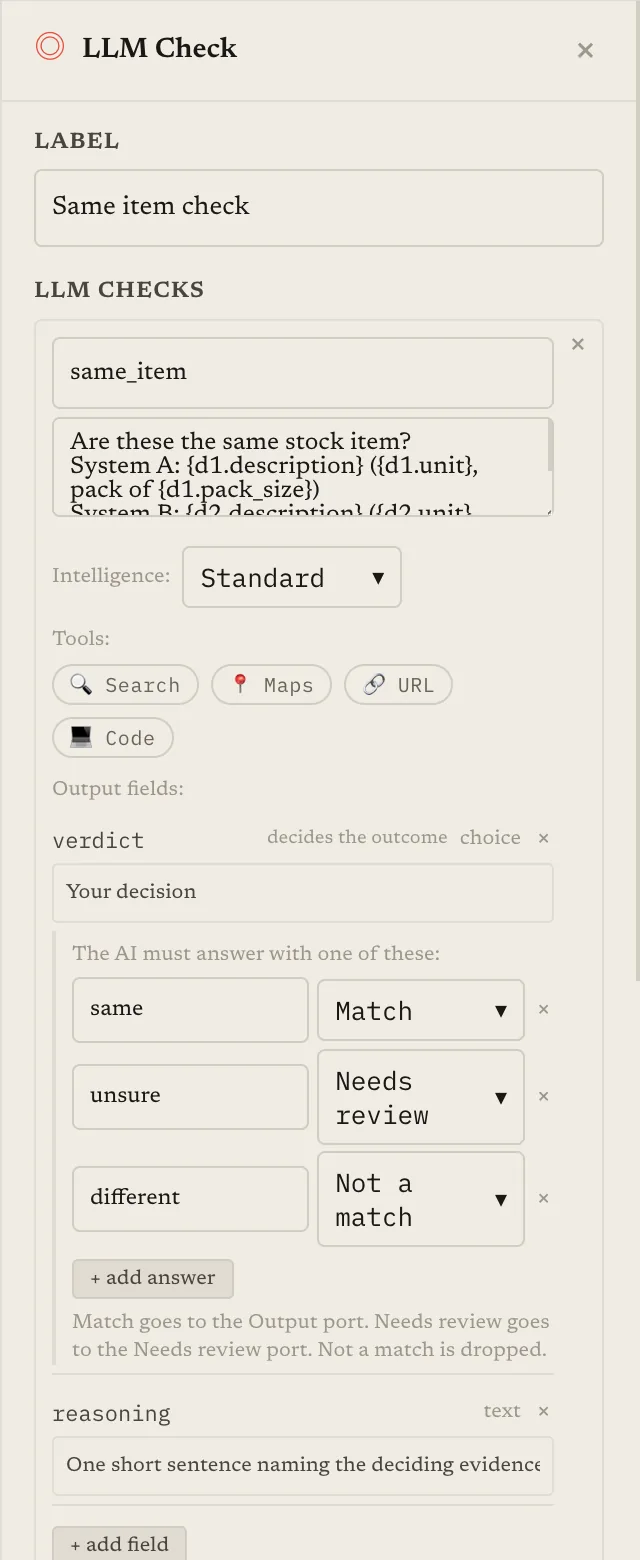
You list the allowed answers, up to eight, and attach a route to each one:
| Answer | Route | What happens to the pair |
|---|---|---|
| same | Match | Continues down the pipeline as a match. |
| uncertain | Needs review | Set aside for a person. Never silently accepted or dropped. |
| different | Not a match | Dropped from the matches and counted in the step's totals. |
At least one answer must route to Match. Pairs routed to review leave through a separate output of the step, and they are also written to a readable file with both records side by side, so they are never lost even if you have not wired anything to that output yet. Wire them to a Human Review step and people answer them in the app. The idea is the same one behind two thresholds with a review band: spend human attention on the pairs where it changes the outcome.
If one step holds several checks, a pair has to be routed to Match by every one of them to stay in the matches, and a Not a match from any one of them ends it.
What if the model answers something you did not allow?
With a choice answer, the model is constrained to your list of values, so it cannot invent a fourth one. When tools are on (see below) that constraint cannot be enforced the same way, so the answer is requested in a fixed format and checked afterwards.
Either way the rule is the same: an answer outside the allowed list is not accepted. The step asks again a few times. If the pair still has no usable answer, it is counted as unjudged, left out of the matches, and listed in a separate file with the reason. This is called failing closed. A pair that nobody could judge is not a match, and it is not hidden either; you see how many there were and can look at them.
The alternative, quietly mapping a malformed answer to “probably yes”, would make every glitch a false match.
Should the check explain itself?
You can add an optional reason field, a text answer where the model gives a short explanation. It has two uses. Reviewers read it next to the pair, which speeds them up. And when you read a sample of wrong answers, the reasons show whether the prompt is unclear or the model is misreading the data.
Treat the reason as a debugging aid, not as evidence. A fluent explanation for a wrong answer is still a wrong answer. A reason also adds a little to what each pair costs, since there is more to write.
Standard or boosted intelligence?
Each check has an intelligence setting: standard or boosted. Boosted is the stronger setting and uses more credits per pair. A sensible way to choose is to run the standard setting on a sample, read the mistakes, and move up only if the mistakes are the kind a stronger setting would fix, such as subtle differences in product attributes. If the mistakes come from a vague prompt or from missing information in the records, a stronger setting will not help.
Can an AI check look things up?
Optionally. A check can be allowed to use tools: Search, Maps, URL and Code. They are off by default, and each is something the records themselves cannot give you.
- Search helps when the question needs outside facts, for example whether two differently spelled company names refer to the same organization.
- Maps helps with addresses and places.
- URL reads the content of a link that appears in a record.
- Code lets the check calculate something instead of estimating it.
Maps cannot be combined with any other tool. Search, URL and Code can be combined. Checks with tools turned on run at boosted intelligence so they can reason about what they find, lookups are charged extra, and the number of pairs such a check judges is limited more tightly than a plain one, best-scoring first, so put a filter in front to choose which pairs it sees. The check decides for itself whether a pair needs a lookup; a pair it can judge from the text alone costs no lookup.
Try the check without tools first. Turn them on for the cases where your own error review shows that the records do not contain enough to decide.
How do you keep the cost under control?
An AI check is typically the most expensive step in a pipeline, and its cost follows the number of pairs it reads.
- Filter first. Everything cheaper than the AI check should run before it.
- Cap the pairs. You can set the most pairs a check will read. If more arrive, the highest-scoring ones go first.
- Queued processing. Where it is offered, Value mode or Batch mode lowers the price in exchange for a slower response, which suits large jobs that are not urgent.
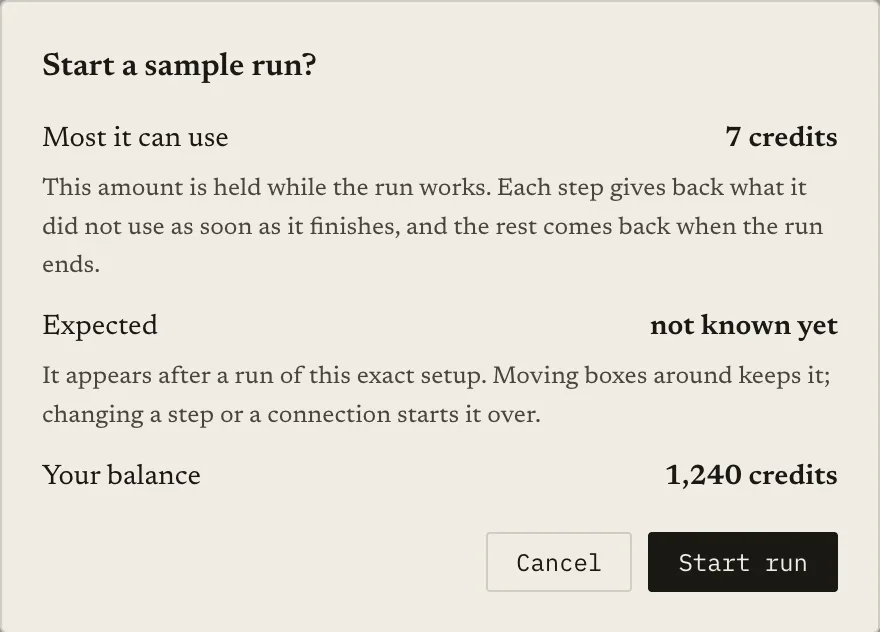
- Sample before the full run. A sample run reads only part of your data and tells you how the check behaves and what each pair costs. A sample caps how many pairs the check reads and may contain few true matches, so use it to catch bad prompts, not to estimate recall. The cost side is covered in know what a matching run will cost before you start.
How do you decide whether to trust it?
Not by looking at a few answers and finding them sensible. Take a labelled sample, pairs where you know the right answer, and measure what the check does with them: how many of its matches are right (precision) and how many true matches it finds (recall). How to measure matching quality walks through it. Then check the uncertain group separately: does it contain the genuinely hard pairs, or are easy ones landing there?
Be honest with yourself about what the technology is. Language models misread details, miss a unit or a version number, and can answer differently on near-identical inputs. A check is a strong first reader, not a source of ground truth. It is why the uncertain route exists, and why keeping a person in the loop for those pairs is part of the design and not a failure of it. If you wonder how this compares with pasting data into a general chat assistant, can ChatGPT do fuzzy matching? covers where that approach breaks down.
Keep reading
- Can ChatGPT do fuzzy matching? Yes — but here’s where it breaks down: the same idea without a pipeline around it
- Auto-accept, review, reject: using two match thresholds: sending the doubtful band to people
- Deterministic vs probabilistic matching, benchmarked: what the earlier steps can and cannot do
- How to measure matching quality: precision, recall and F1 on a labelled sample
Ready to match your data?
Create a free account, upload your CSV files, and configure matching in plain English. 100 free credits — no credit card required.
Free account No credit card Match your files in minutes