Finding duplicates in one big file without comparing every pair
Comparing a list with itself grows with the square of its size. A recipe that finds near-duplicates without listing every pair, then removes them.
A single customer list with 10,000 rows has 49,995,000 distinct pairs. At 100,000 rows it has just under five billion. That is plain arithmetic (n times n minus 1, divided by 2), and it is the reason deduplicating one big file feels different from matching two: the work does not grow with the file, it grows with the square of the file. Nearly all of those pairs are obviously not duplicates, and you pay to look at every one of them if you build the full list first.
The way out is to never list them. This post walks through a recipe that finds near-duplicates in one file, keeps one row per group, and spends AI only on the few pairs that are genuinely close. It is the same idea as blocking keys, with embeddings doing the blocking.
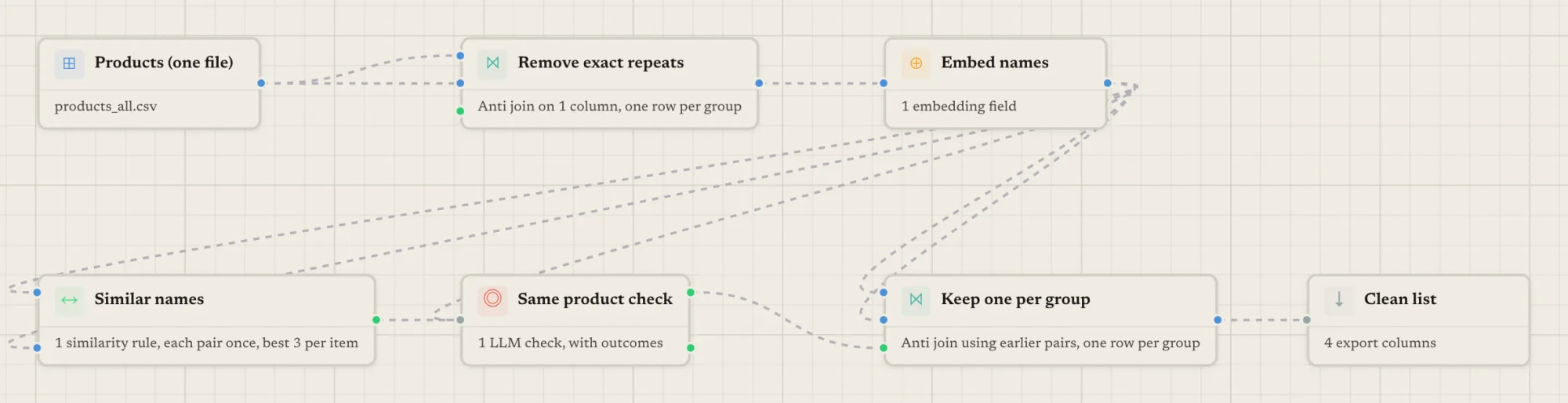
Start by removing the exact duplicates
Exact duplicates are the cheapest ones to remove and the best way to shrink the file before anything costs credits. In Match Data Studio this is a Join step with the same upstream step wired into both dataset inputs:
- key columns in the join, ideally cleaned first with a Transform (trim, lowercase, strip punctuation);
- join type “anti”, with “exclude self” and “once per pair” switched on;
- output set to dataset, and duplicates set to “keep first”.
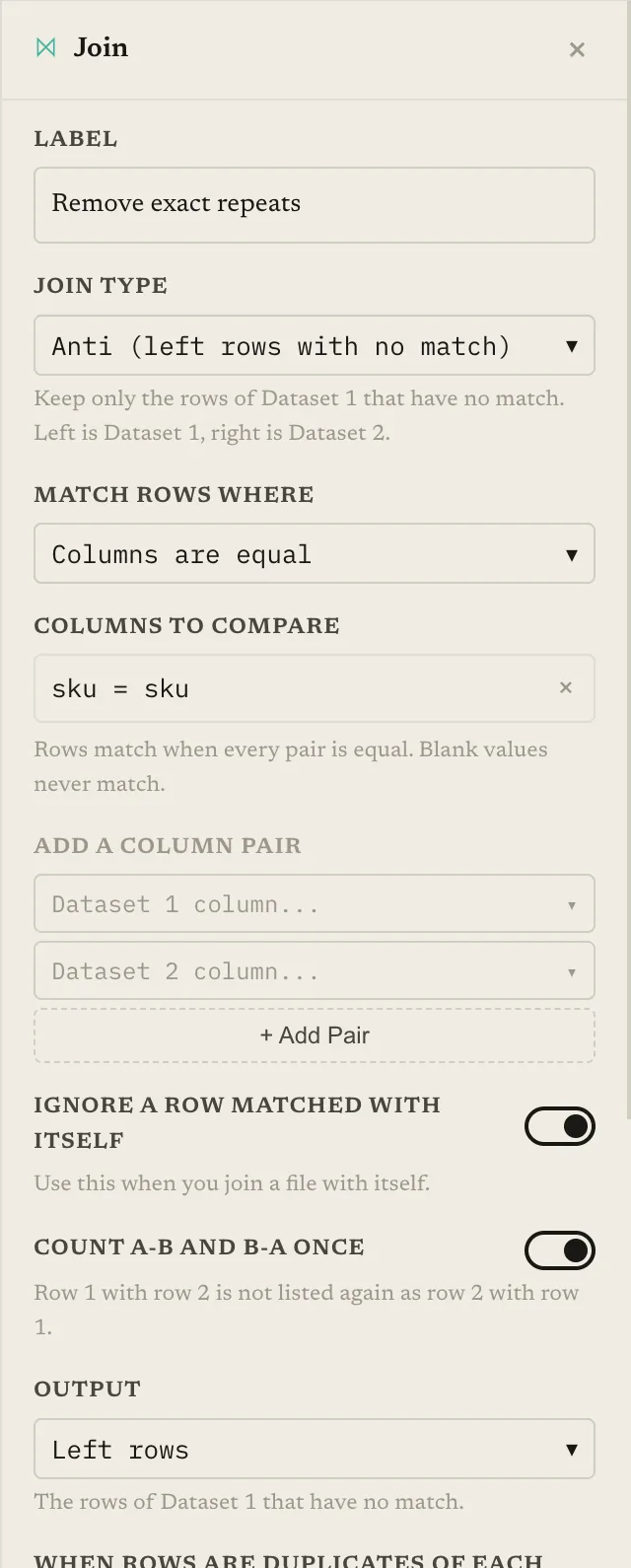
The result is the file with one row per group of equal keys. Rows with a blank key never match, so they all survive. The output gains dup_group_id and dup_group_size columns, and if you also set a merge column, the kept row gets a merged_<column> listing what was removed. The kept row is the one with the smallest match_id, the id each row carries through the pipeline.
This step is free, and every row it removes is a row you will not embed. For the basics of exact and near-exact duplicates in a spreadsheet, see how to find and remove duplicates in a CSV file.
Why not just compare every pair?
Because you would be building the biggest possible list to throw most of it away. The usual pipeline for two files is Cross Join, then Similarity Score, then a filter. Cross Join writes out every pair before anything is scored, which is fine for two small files and a poor fit for one large one. The general version of this problem is covered in matching at scale.
Blocking keys help when you trust a field to be the same for true duplicates, such as a postal code. For names, addresses and product titles, the duplicate often differs in exactly the field you would block on. Embeddings give you a different kind of block: rows whose text means roughly the same thing land close together, whatever the spelling.
Embed, then find similar pairs
Add an Embedding step on the cleaned column (or on several columns together, using a template such as name: {name}; city: {city}). The step writes a column called embedding_<name>. Embeddings are charged by use, which is why the exact-duplicate pass comes first. There is also a size setting for the vectors: larger sizes are more precise and slower.
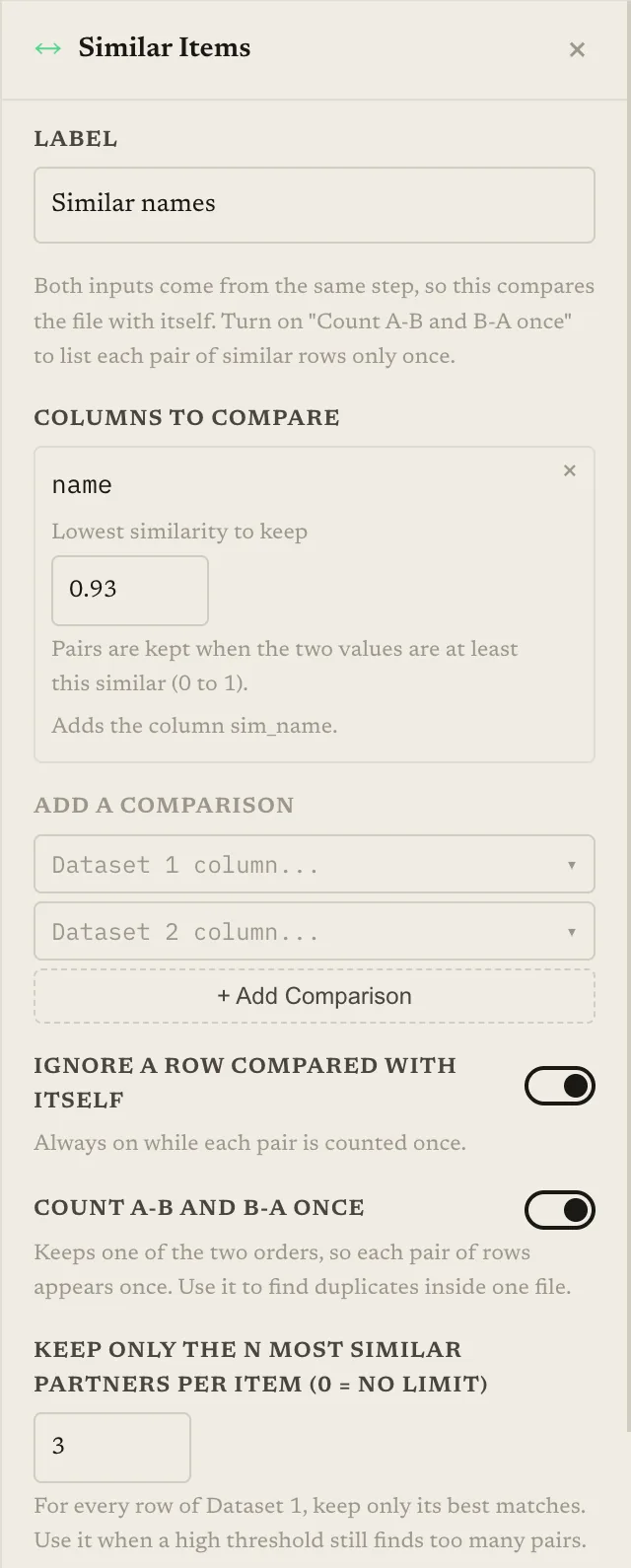
Then comes the Similar Items step. It finds pairs whose embeddings are at least as similar as a threshold, without listing the combinations that fall below it. For a single file:
- wire the same Embedding step into both dataset inputs;
- turn on “once per pair”, so A-B and B-A are one pair and a row is never paired with itself;
- set a rule per embedded field, with a threshold between 0 and 1. A pair has to pass every rule;
- optionally set “max per item”, the number of best partners kept for each row. Zero means no limit.
Which threshold? It depends on your data and on the embedding, so treat any number as a starting point to tune on a labelled sample, not a rule. A high value such as 0.93 is a sensible place to begin looking (hypothetical, not a recommendation for your file), and the lower you go, the more candidates and the more work for the check that follows. Understanding similarity thresholds explains why a cutoff does not carry from one dataset to another.
The output is a list of pairs, each with a sim_<name> score column, sorted by row and then by descending score.
Is the result the same as comparing every pair?
For the pairs this step returns, yes. That is by design, not an approximation. Internally it works in chunks with a fast matrix pass that picks candidate pairs with a small safety margin below the threshold. The keep-or-drop decision is then made with the same per-pair score and the same “at least this similar” comparison as the Similarity Score step. So the set of pairs and their scores match what Cross Join plus Similarity Score would give at the same threshold. The saving is that the pairs below the threshold are never written out.
Two settings do change the result on purpose:
- Threshold. A higher value drops pairs that a lower one keeps. That is the same trade as in any matching run.
- Max per item. It keeps only the best N partners of each row, after the other filters. With “once per pair” on, each pair is listed under the lower-numbered row of the two, so the limit counts those. A group of ten near-identical rows can lose pairs under a small limit. Groups are formed from connected pairs, so a group may still hold together through other pairs, but do not assume it. Use the limit to bound a result that is too large, not as a quality setting.
What the guardrails are
- Rows without an embedding never match. A missing, blank or zero vector is excluded at every threshold. A missing
embedding_<name>column is an error that names the column, rather than a silent empty result. - A cap on the size of the result. The step stops when the number of pairs it would return goes past a limit, and tells you to raise the threshold or set a maximum per item. The cap counts the pairs that are kept, not the product of the rows, so a high threshold on a big file is fine.
- Both sides must use the same embedding size. Using the same Embedding step on both inputs takes care of that automatically.
- Chains. If A is close to B and B is close to C, the three end up in one group even when A and C are not close to each other. Review groups that look too large.
Confirm candidates with an AI check
The pairs that survive the similarity step are candidates, not duplicates. Two products that differ in one digit, or two people who share a name, can sit well above any threshold. An AI check reads each pair and decides.
Use a choice field with three answers and map each one to a route: “same” goes to match, “uncertain” goes to review, “different” is dropped. The model can only answer with one of the listed values. Pairs routed to review leave on a separate “held” output that you can wire to a Human Review step, where a person decides them; the run pauses until they answer or the deadline passes. Pairs the check cannot judge are not matched; they are set aside in a separate file.
The check is charged per pair, so the earlier steps are what keep it affordable. Two controls matter: “most pairs to check”, which limits how many pairs go to the AI (best-scoring first) and caps what the run holds, and a sample run, which checks only a small number of pairs and shows you the price per pair. A caution on samples: by default a sample reads the first rows of the file, and a handful of rows may hold no duplicates at all. The source step can read random rows instead, but duplicates need both members in the sample, so a small sample can still look cleaner than the file is.
Remove the duplicates and keep one row per group
The last step is another Join, this time in “pairs” mode:
- the checked pairs (or the Human Review output, if you added one) go into the optional pairs input;
- the dataset the pairs came from (the Embedding output, which keeps the same rows and
match_ids) goes into both dataset inputs; - join type “anti”, output dataset, duplicates “keep first”.
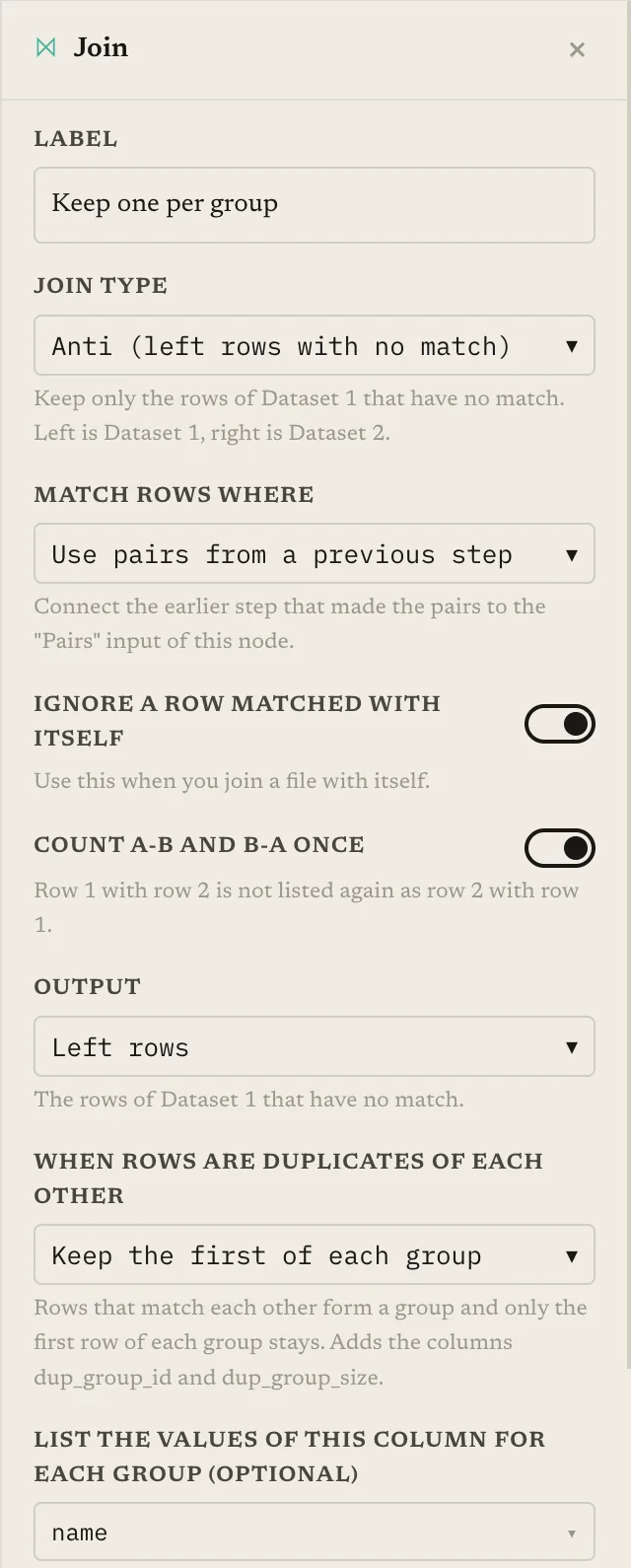
Groups are the connected components of the accepted pairs, so AB and BC are one group. The row with the smallest match_id is kept, rows with no partner are kept, and the output gains dup_group_id, dup_group_size and, if you set a merge column, merged_<column>. Both inputs must be the same dataset; the step checks this and refuses to merge rows of two different ones.
| Step | What it does | Charged |
|---|---|---|
| Join, remove duplicates | Exact duplicates, keep first | Free |
| Embedding | One vector per remaining row | By use |
| Similar Items | Pairs above the threshold, not every pair | Free |
| AI check | Same / uncertain / different per pair | Per pair checked |
| Human Review (optional) | A person answers the uncertain ones | Free |
| Join, pairs mode, keep first | One row per group | Free |
If you want to keep every row and just see the groups, a Group Items step turns accepted pairs into groups across the file, with a group id on every item.
Keep reading
Ready to match your data?
Create a free account, upload your CSV files, and configure matching in plain English. 100 free credits — no credit card required.
Free account No credit card Match your files in minutes