Know what a matching run will cost before you press run
AI matching can run up a bill. How to see the ceiling and the likely cost first, test on a sample, stop a run midway, and keep each step's cost down.
A team uploads its files, drops an AI check into the middle of the pipeline and presses run. Nobody can say whether it will use a tenth of the balance or all of it, and once the run is going there is no obvious way to find out or to get out. Most people respond by not running anything big, which is a shame, because the answer is usually knowable in advance.
AI matching is different from a database join in one way that matters for budgeting: the expensive part scales with the number of pairs you ask a language model to judge, and that number depends on how good your earlier filters are. So cost control is partly a pipeline-design problem and partly a question of what the tool tells you before, during and after the run. This post covers both.
What should a cost estimate tell you?
Three things, and a good tool answers all of them.
- A ceiling. The most the run could possibly use, so a bad configuration cannot surprise you.
- A realistic expectation. What the run will probably use, with honest wording about how sure that is.
- A way out. If the run is heading somewhere you do not like, you can end it and pay only for what was actually done.
A single “estimated cost” number blurs the first two. A worst case is deliberately pessimistic, and an expectation is deliberately optimistic about your data. Showing one number for both makes the pessimistic one look like a quote and the optimistic one look like a promise.
What you see before you start a run
In Match Data Studio, pressing run on the canvas opens a confirmation card before anything is charged. It shows three lines.
| Line | What it means | How to read it |
|---|---|---|
| Most it can use | The worst case for this setup and these files. | A ceiling, not a forecast. Most runs use much less. |
| Expected | What an earlier run of the exact same setup really used, scaled to the size of this one. | A guess, not a promise. It reads "not known yet" until such a run exists. |
| Your balance | The credits you have now. | Compare it with the ceiling, not only with the expectation. |
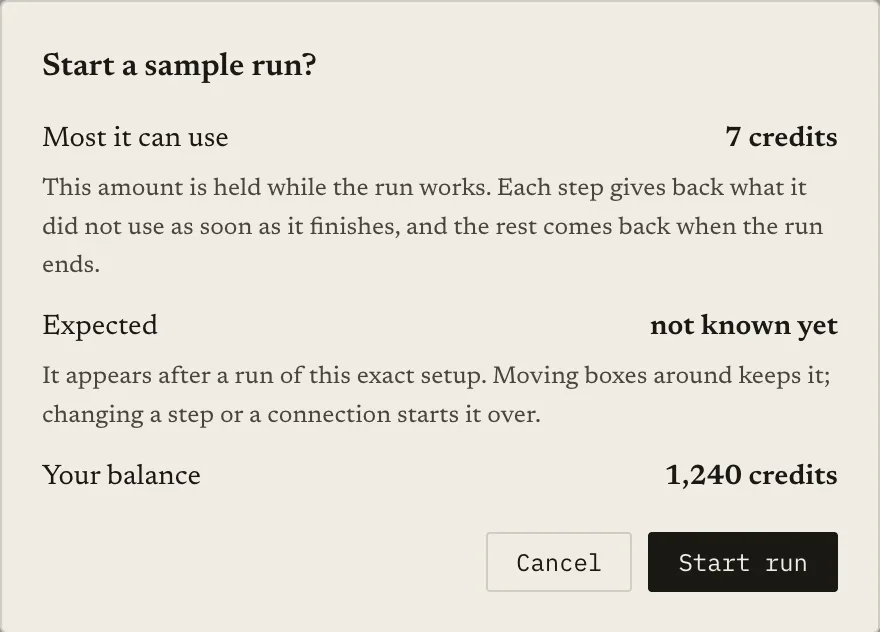
The expected amount comes from your own history. It appears after a run of this exact setup. Moving boxes around on the canvas keeps it; changing a step or a connection starts it over, because a different pipeline is a different cost. It can be based on your last full run of the same setup, that run scaled to the size of the new one, or a sample run scaled up to the full size.
That last case is the reason to start small.
Why run a sample first?
A sample run reads only part of your data, so it costs little, and it gives the next full run something to scale from. It also tells you whether the configuration works at all, which is the cheaper lesson to learn early. For the quality side of that question, see how to measure matching quality.
Know what a sample can and cannot tell you:
- It is limited by design. A sample reads a small number of rows from each file: the first rows, or random rows if you choose that option. You can raise or lower how many.
- It may contain few true matches. Rows are picked separately in each file, so a sample of two large files can contain only a handful of real pairs. Do not judge recall from it.
- Its AI checks are capped. A sample does not send an unlimited number of pairs to an AI check, so it measures the price per pair better than it measures the number of pairs a full run will produce.
Use a sample to catch broken prompts, wrong columns and surprising costs per pair. Do not use it as proof that the full run will behave the same.
What happens to your credits while a run works?
Before the run starts, the maximum is held from your balance. That is the safe way to guarantee the run can finish. The hold is not the price.
- As AI steps finish, the part of their share they did not use goes back to your balance. The run page header shows it, for example “N credits held · M returned so far”.
- When the run ends, the credits it really used are charged and the rest comes back. The header then reads “N credits used · M returned”.
- If the run fails, it is refunded in full.
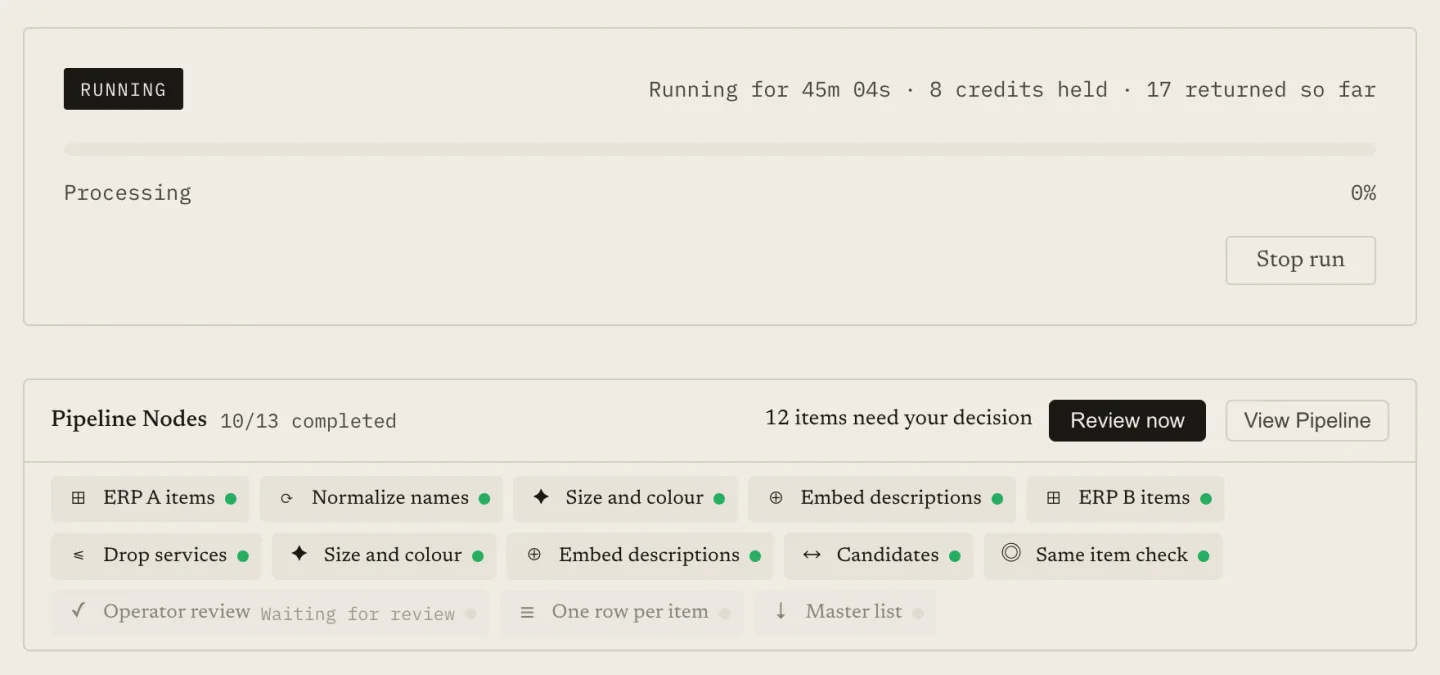
Credits are the only unit you see. There is no second currency to reconcile.
What if my balance is lower than the maximum?
A ceiling that must be covered before you can start is a gate, and a worst case is exactly the number most runs never reach. So Match Data Studio treats a balance below the maximum as a warning, not a blocker, as long as the balance covers a small minimum.
The card says so plainly: the run can still start, using the credits you have. The details worth knowing:
- The whole balance is held for the run and whatever is not used comes back when the run ends. Early return as steps finish does not apply to a run that started this way.
- Before an AI step spends, the run checks that it has enough for that step. If it does, it goes ahead.
- If it does not, and your balance cannot cover the gap, the run pauses before that step. The run page says “Waiting for credits” with a button to add more, and you also get an e-mail.
- You have 24 hours. Add credits and the run continues from where it stopped, with finished steps and their results untouched.
- If none arrive, the run stops, keeps the credits that finished steps used and returns the rest.
The point of this design is that a modest balance does not lock you out of a job that would have fit comfortably, and a job that turns out bigger than expected cannot silently drain more than you had.
How do I stop a run that is going wrong?
Wrong file, wrong threshold, a full run when you meant a sample: the Stop run button on the run page ends a queued or running run. A confirmation says what will happen: credits already used by finished steps are kept, the rest are returned to your balance, and it cannot be undone.
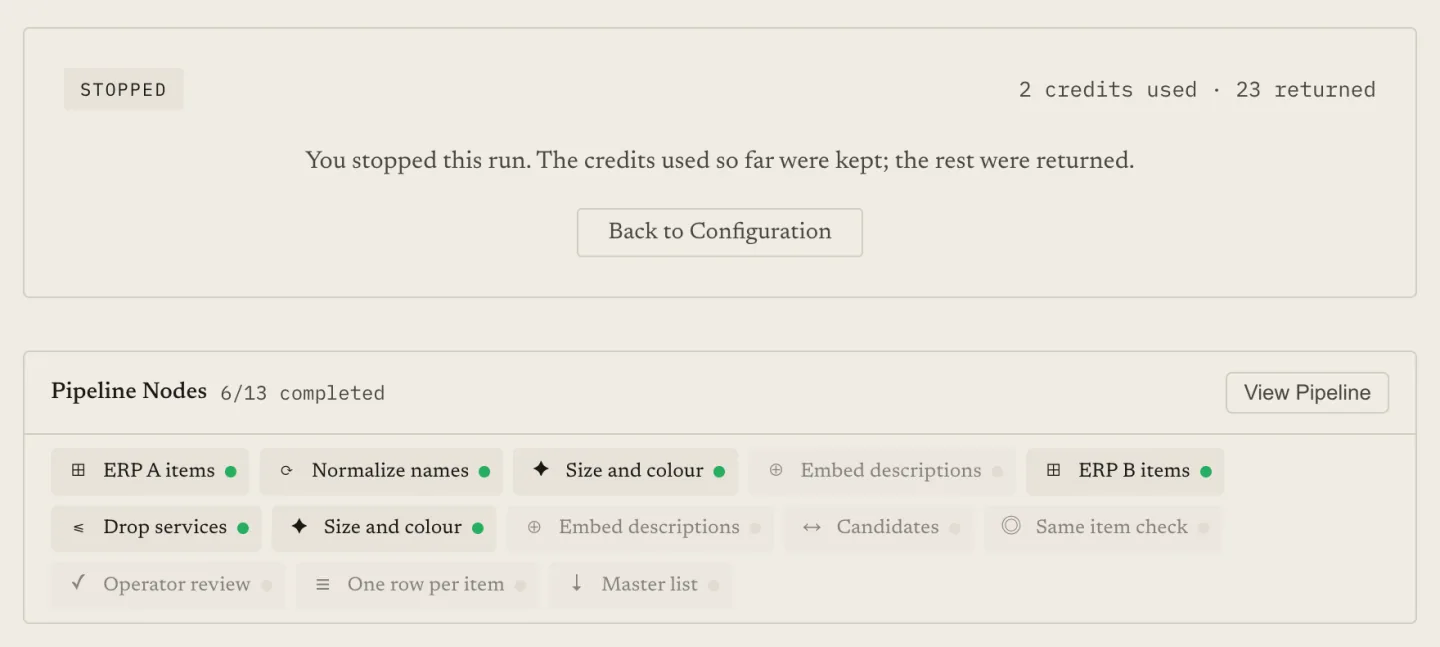
After the stop, the run shows as stopped, finished steps keep their results and previews, steps that had not finished show as not run, and your project files unlock for changes. You are charged for finished steps only, so a step that was still working when you stopped does not add to the bill.
Keeping the used credits, rather than returning everything, is a deliberate trade. Finished steps produced something real, and returning all credits would let anyone harvest results for free by stopping every run at the last moment.
Which runs get refunded in full?
A run that fails is refunded in full, once. The run page shows “N credits refunded”. Failure here means the run could not complete, not that you disliked the result; a completed run with weak matches is charged for what it used.
How to keep the bill down on any tool
Product features only manage the bill. The bill itself is set by how many pairs reach the expensive step. These habits apply to any AI matching setup.
Put cheap filters before AI steps. Exact keys, prefixes, numeric ranges and similarity thresholds cost almost nothing per pair. Each pair they remove is a pair no language model needs to read. The mechanics are in blocking keys for large matching jobs and matching at scale.
Limit how many pairs an AI check looks at. Match Data Studio lets you set the most pairs one AI check may judge. If more arrive, the best-scoring ones are sent first. That limit also lowers the amount held at the start, because it lowers the worst case.
Use the stronger setting only where it earns its price. Boosted intelligence uses more credits per pair than standard. Run the standard setting on a sample, look at the mistakes, and move up only if they are the kind a stronger setting fixes.
Use queued processing when you can wait. Some AI steps offer a mode that trades a slower response for a lower price: Value mode, or Batch mode, where results can take from minutes to about a day. It suits large jobs that are not urgent.
Re-measure after every filter change. A stricter filter saves credits and can also discard true matches before the AI sees them. Check precision and recall on a labelled sample each time you tighten one, as covered in how to measure matching quality.
A practical order of operations
- Build the pipeline with the cheapest filters first.
- Run a sample. Read the results and the credits it used.
- Fix prompts, thresholds and filters; run another sample if anything changed.
- Open the full-run card. Compare the ceiling with your balance and the expected amount with the ceiling.
- Start the run, watch the first steps, and stop it if the early results look wrong.
Keep reading
- Matching at scale: strategies for millions of records: where the time and the cost go
- How to set up blocking keys to speed up large matching jobs: fewer pairs before any AI step
- How to measure matching quality: precision, recall and F1 on a labelled sample
- Auto-accept, review, reject: using two match thresholds: a middle band for people instead of more AI calls
- What is an AI check? Using a language model as the judge of a match
Ready to match your data?
Create a free account, upload your CSV files, and configure matching in plain English. 100 free credits — no credit card required.
Free account No credit card Match your files in minutes